
How to recover unsaved files in Windows
May 20, 2026
Upgrade Windows 10 to Windows 11 for Free
June 9, 2026
If you’ve just installed Windows 11 or Windows 10, you’re probably looking for software that improves performance, security, productivity, and everyday usability.
The good news is that many of the best Windows applications are completely free.
We’ve tested dozens of utilities and selected the 25 best free Windows tools you should install in 2026.
1. Microsoft PowerToys
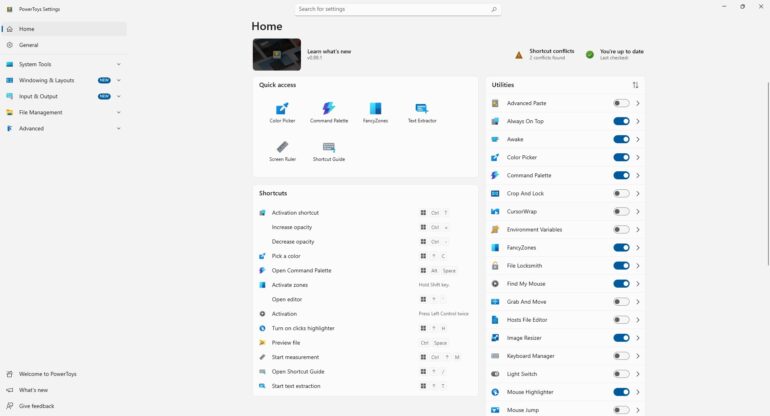
PowerToys adds advanced features to Windows, including:
- FancyZones window management
- Keyboard Manager
- File Preview enhancements
- Mouse utilities
- PowerRename
Perfect for power users and productivity enthusiasts.
2. Everything Search
Windows Search can be slow.
Everything instantly finds files and folders across your entire PC in seconds.
Why users love it:
- Lightning-fast search
- Minimal system resources
- Completely free
3. ShareX
Need screenshots or screen recordings?
ShareX offers:
- Screenshot capture
- Screen recording
- GIF creation
- OCR text recognition
- Workflow automation
4. Bitwarden
A free password manager that stores and protects all your passwords securely.
Benefits:
- End-to-end encryption
- Browser integration
- Multi-device sync
5. VLC Media Player
Still one of the best media players available.
Supports:
- MP4
- MKV
- AVI
- FLAC
- DVDs
Without additional codecs.
6. CrystalDiskInfo
Monitor your SSD and HDD health before they fail.
It displays:
- Drive temperature
- Health status
- SMART information
7. Malwarebytes Free
A great second-opinion malware scanner that works alongside Microsoft Defender.
8. 7-Zip
The best free archive utility.
Supports:
- ZIP
- RAR
- 7Z
- TAR
- ISO
9. Revo Uninstaller
Removes software completely and cleans leftover files.
10. HWMonitor
Monitor CPU, GPU, and motherboard temperatures in real time.
11. OBS Studio
The most popular free screen recording and streaming software.
12. Notepad++
A powerful replacement for Windows Notepad.
13. Rufus
Create bootable Windows USB drives in minutes.
14. WizTree
Find large files eating your storage space instantly.
15. EarTrumpet
Advanced volume controls for Windows.
16. BleachBit
Clean temporary files and recover disk space.
17. WinDirStat
Visualize storage usage with colorful file maps.
18. Bulk Crap Uninstaller
Remove unwanted software in batches.
19. LibreOffice
A free alternative to Microsoft Office.
20. QuickLook
Preview files instantly with the Spacebar, similar to macOS.
21. Greenshot
Lightweight screenshot utility.
22. AutoHotkey
Automate repetitive tasks and create powerful shortcuts.
23. CPU-Z
Detailed hardware information for your PC.
24. GPU-Z
Comprehensive graphics card information.
25. Microsoft PC Manager
A free Windows optimization tool from Microsoft.